'%3e%3cpath%20d='M248.027%20159.993C292.176%20159.993%20328.105%20124.1%20328.105%2079.996C328.105%2035.892%20292.191%200%20248.027%200C203.863%200%20167.95%2035.892%20167.95%2079.996C167.949%20124.101%20203.878%20159.993%20248.027%20159.993ZM213.969%2045.973C223.069%2036.882%20235.155%2031.873%20248.027%2031.873C260.899%2031.873%20272.986%2036.882%20282.086%2045.973C291.186%2055.064%20296.2%2067.154%20296.2%2079.997C296.2%2092.84%20291.186%20104.93%20282.086%20114.021C272.986%20123.112%20260.899%20128.12%20248.027%20128.12C235.155%20128.12%20223.069%20123.111%20213.969%20114.021C204.869%20104.93%20199.871%2092.84%20199.871%2079.997C199.871%2067.154%20204.884%2055.063%20213.969%2045.973Z'%20fill='%23EE4323'/%3e%3cpath%20d='M150.16%200L57.6821%20159.993H94.5381L187%200H150.16Z'%20fill='%23EE4323'/%3e%3cpath%20d='M92.478%200L0%20159.993H36.856L129.334%200H92.478Z'%20fill='%23EE4323'/%3e%3c/g%3e%3cdefs%3e%3cclipPath%20id='clip0_296_834'%3e%3crect%20width='328.105'%20height='159.993'%20fill='white'/%3e%3c/clipPath%3e%3c/defs%3e%3c/svg%3e)


What security teams need to know about the browser-based attack techniques that are the leading cause of breaches today.
What security teams need to know about the browser-based attack techniques that are the leading cause of breaches today.
The view that "the browser is the new endpoint" and "the new battleground for cyber attacks" is becoming increasingly advocated by security leaders. But what does this actually mean for security teams?
In this article, we’re cutting out the jargon to explore what a browser-based attack is, and what’s required for effective detection and response.
What is the goal of a browser-based attack?
First, it’s important to establish what the point of a browser-based attack is.
In most scenarios, attackers don’t think of themselves as attacking your web browser. Their end-goal is to compromise your business apps and data. That means going after the third-party apps and services that are now the backbone of business IT — and therefore the top target for attackers.
The most common attack path today sees attackers log into third-party services, dump the data, and monetize it through extortion. You need only look at last year’s Snowflake customer breaches that impacted 165+ organizations, or the still-ongoing Salesforce attacks to see the scale of the problem. Identity weaknesses played a material role in almost 90% of Unit 42's investigations, and Google/Mandiant reported that identity issues were the initial access vector in 83% of cloud-related incidents.
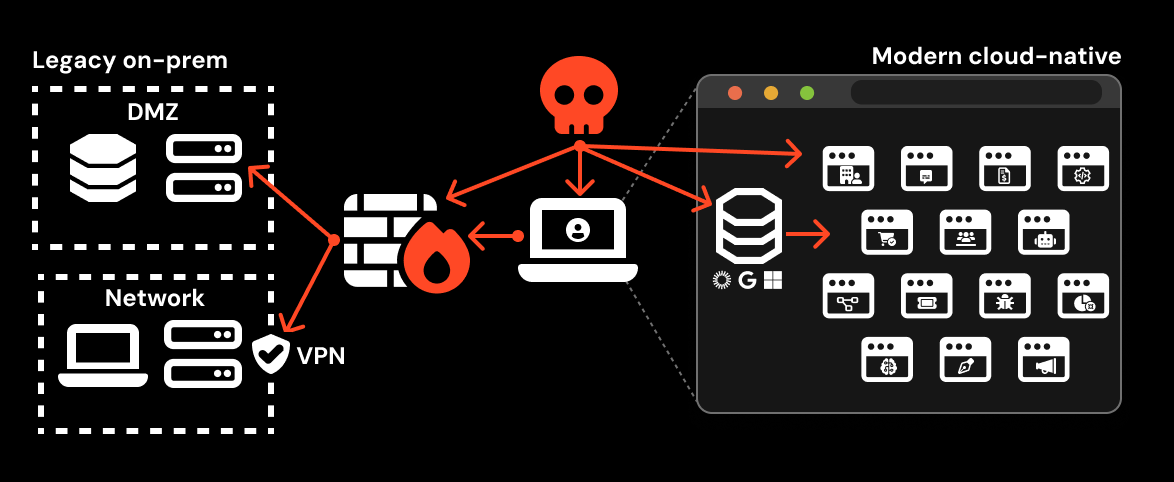
The most logical way to do this is by targeting users of those apps. And because of the changes to working practices, your users are more accessible than ever to external attackers.
Once upon a time, email was the primary communication channel with the wider world, and work happened locally — on your device, and inside your locked-down network environment. This made email and the endpoint the highest priority from a security perspective. But now, with modern work happening across a network of decentralized internet apps, and more varied communication channels outside of email, it’s harder to stop users from interacting with malicious content (at least, without significantly impeding their ability to do their jobs).
Given that the browser is the place where business apps are accessed and used, it makes sense that attacks are increasingly playing out there too.
With that covered off, let’s take a closer look at the most prevalent browser-based attack techniques being used by attackers in the wild today.
The 6 key browser-based attacks that security teams need to know about
Browser-based attacks have surged in volume and variety over the past two years, driven by PhaaS industrialization, new social engineering mechanics, and the shift to identity-first TTPs.
Here's our breakdown of the top 6 browser-based attacks that should be on every security team's radar right now. Check out the videos for 101 explainers!
1. Phishing for credentials and sessions
The most direct way for an attacker to compromise a business application is to phish a user of that app. You might not necessarily think of phishing as a browser-based attack, but that’s exactly what it is today.
Phishing tooling and infrastructure has evolved a lot in the past decade, while the changes to business IT means there are both many more vectors for phishing attack delivery, and apps and identities to target. Attackers can deliver links over instant messenger apps, social media, SMS, malicious ads, and using in-app messenger functionality, as well as sending emails directly from SaaS services to bypass email-based checks. Likewise, there are now hundreds of apps per enterprise to target, with varying levels of account security configuration.
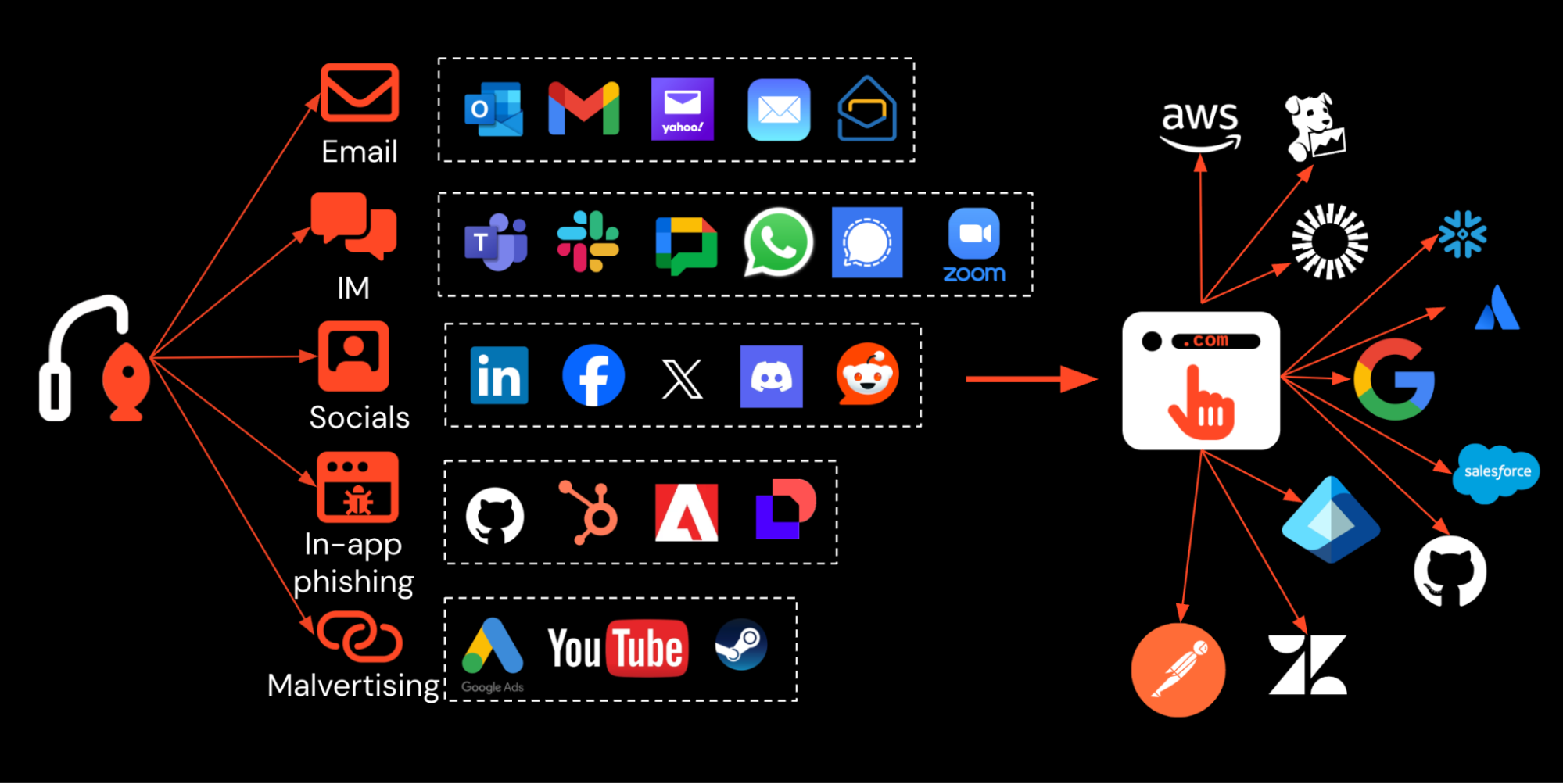
Whereas phishing was once entirely focused on credential theft, modern phishing attacks see the attacker intercept the victim’s session on the target app, using reverse-proxy Attacker-in-the-Middle kits that are the standard choice for attackers today. This means most forms of MFA can be bypassed, with the exception of passkeys (though attackers are finding ways to work around passkeys using downgrade attacks).
There are other key differences to be aware of too. Today, phishing operates on an industrial scale, using an array of obfuscation and detection evasion techniques. The latest generation of fully customized AitM phishing kits are dynamically obfuscating the code that loads the web page, implementing custom bot protection (e.g. CAPTCHA or Cloudflare Turnstile), using runtime anti-analysis features, and using legitimate SaaS and cloud services to host and deliver phishing links to cover their tracks.
This means that traditional anti-phishing tools at the email and network layer are struggling to keep up, with many attacks evading email-based detections (or bypassing email altogether). At the same time, proxy-based solutions now see a garbled mess of JavaScript code without the necessary context of what is actually happening in the browser to be able to piece it together effectively. Even if they don’t realize it, this means many organizations are now relying solely on blocking known-bad sites and hosts — a wildly ineffective solution with the rate that attackers refresh and rotate their phishing infrastructure.
These changes make phishing more effective than ever, and increasingly difficult to detect and block without being able to observe and analyze web pages that a user interacts with in real time — something only possible with browser-level visibility.
Case study: Scattered Lapsus$ Hunters' (SLH) real-time AiTM campaign. SLH targeted 100+ companies — including Betterment, Crunchbase, SoundCloud, and Match Group — with tens of millions of records stolen as a result. Powered by real-time operated kits where attackers walk victims through the login in real time via voice phishing, these attacks combine a branded phishing page, real-time session relay, persistent passkey registration by the attacker for ongoing access, and a confirmation email to reduce suspicion — followed by mass data exfiltration from enterprise cloud and SaaS.
2. Malicious copy and paste (aka. ClickFix, FileFix, etc.)
Since late 2024, attackers have been tricking users into performing malicious actions under the pretext of "fixing" an issue for a webpage to load. The most common scenarios relate to "verifying that you are human," styled as a version of the bot protection challenges we're all used to encountering on the internet today.
Microsoft's Digital Defense Report identified ClickFix as the most common initial access vector, accounting for 47% of observed attacks. CrowdStrike recorded a 563% increase in fake CAPTCHA ClickFix lures. Push's own detection data tells a similar story: ClickFix made up an average of 52% of detections through Q2 2026, surpassing all other browser-based attack categories for the first time.
Traditional ClickFix-style attacks are a hybrid of browser and endpoint targeting. While delivered via the browser, the user copies and runs malicious scripts on their endpoint, targeting a wide range of legitimate, pre-installed system tools that allow commands to be run (Living Off the Land Binaries, or LOLBins). This results in the user installing malicious software on their machine — typically Remote Access Tools (RATs) and infostealer malware.
Notably, ClickFix remains a trap that users fall into rather than something they're targeted with directly. 4 in 5 ClickFix payloads intercepted by Push are accessed from search engines — the result of compromised sites, malvertising, and SEO poisoning. This naturally means they completely bypass email-based security controls.
ClickFix continues to spawn new tools and sub-techniques. ClickFix-as-a-Service platforms are achieving 60% victim conversion rates. Payloads are highly variable, with Push capturing 84 distinct command forms targeting 16+ different system binaries. EtherHiding — storing kit configuration on public blockchains — means there's no host to take down and no domain to block. Attackers are also using shared conversations on AI chatbot platforms like ChatGPT and Claude to deliver malware via pages hosted on trusted, legitimate domains.
These varied delivery mechanisms and payloads make ClickFix tricky for traditional security tools to detect in real time. However, every ClickFix attack and variant happens in the browser with a malicious copy and paste event, which is where browser-based tools like Push have a great opportunity to intercept them.
Case study: InstallFix — AI-themed lures take advantage of users looking to install AI tools. Push discovered and named InstallFix, involving malicious imitations of popular AI tool pages, including Claude Code and NotebookLM, being distributed over search engines via malvertising. Because these tools are often installed via command-line script, attackers created pixel-perfect clones of real pages where the install instructions had been replaced with a malicious command. Running the command installed infostealer malware on the victim's machine. The later LLMShare campaign we identified used a similar pattern, but combined it with shared chat artefacts on Claude and ChatGPT for added legitimacy.
3. Authorization phishing
While AiTM phishing targets the login — the moment a user proves their identity — a growing class of attacks targets what happens after the login. Instead of stealing a session from the authentication flow, authorization phishing abuses OAuth authorization mechanisms — consent grants, device code flows, and token exchanges — to obtain access tokens. The attacker never touches the authentication flow at all, which means every form of MFA, including phishing-resistant passkeys, is irrelevant.
Three techniques currently fall under the authorization phishing umbrella:
Consent phishing sees the victim authorize a third-party app via an OAuth consent grant. This can be an app the attacker has created, or a legitimate SaaS app tenant — you can simply sign up for an account and invite targets to your app tenant. Identity providers have substantially hardened their defaults against consent phishing (Microsoft now blocks unverified third-party app consent by default, for example), which is why attackers have increasingly shifted to the next two techniques.
Device code phishing targets a different OAuth flow entirely: the RFC 8628 device authorization grant, originally designed for input-constrained devices like smart TVs. The attacker generates a code, delivers it to the victim via a phishing page, and the victim enters the code on the real identity provider's device login page. Push has tracked a 37.5x increase in device code phishing attacks in 2026, with 30+ distinct kits now offering the technique. Because device code phishing targets apps already consented in the user's tenant (usually first-party Microsoft apps), it sidesteps the consent restrictions that shut down traditional consent phishing.
ConsentFix occupies a middle ground — a ClickFix-OAuth hybrid that targets the standard authorization code grant flow rather than the device code flow. First observed in Russian APT29 campaigns, it has since been commoditized into criminal tooling.
Preventing malicious OAuth grants requires tight in-app management of user permissions and tenant security settings across every app in the estate. Conditional access policies help, but their effectiveness varies significantly by technique — "require compliant device" blocks device code phishing but not ConsentFix, while "block device code flow" breaks legitimate use cases like Azure CLI and conference room hardware. Browser-based security tools are well positioned to observe OAuth grants across all apps accessed in the browser — even the ones the security team doesn't manage or know about.
Case study: Mass Salesforce breaches via device code phishing. Scattered Lapsus$ Hunters' 2025 Salesforce campaign resulted in a claimed 1,000+ organizations compromised and 1.5 billion records stolen — used to extort victims en masse, including an attempt against Salesforce directly. Attackers registered a malicious Salesforce app called "DataLoader" (a fake version of the legitimate app), called victims impersonating IT, and talked them through opening Salesforce and authorizing the new app. The app had broad OAuth scopes — full Salesforce API access and refresh tokens without re-auth — enabling mass data exfiltration via API. The stolen data was then used in further supply chain attacks against downstream organizations.
4. Malicious browser extensions
Attackers use malicious extensions to steal data, log keystrokes, and intercept credentials and tokens as they transit the browser. Most malicious extensions didn't start that way — attackers begin with a legitimate extension and bide their time, waiting until install counts reach maximum impact before deploying a malicious update. It's very easy for attackers to buy and add malicious updates to existing extensions, easily passing extension web store security checks.
There are four common entry paths: phish the developer of a popular extension; offer to buy a widely-installed extension outright; vibe-code your own extension and market it to users; or upload a malicious version and let user browsers auto-update on next launch.
Permissions alone don't indicate risk, since nearly every extension has exploitable ones — 46.76% of extensions across Push customers have the permission combinations needed for account takeover with no user interaction. The most dangerous let attackers intercept sensitive data, credentials, and session tokens in transit. Malicious extensions routinely evade static and sandbox analysis via dynamically compiled, smuggled code, letting them reach official stores and even earn "Featured" or "Verified" status. AI browser extensions add a further dimension: the Verizon DBIR 2026 found that more than 15% of corporate users had unauthorized AI browser extensions installed — extensions that collect and retain browsing context from internal sites, creating a data exfiltration pathway that operates independently of traditional DLP controls.
Generally, your employees should not be randomly installing browser extensions unless pre-approved by your security team. But the reality is that many organizations have very little visibility of the extensions their employees are using, and the potential risk they're exposed to as a result. Static risk scoring is a poor predictor of supply chain compromise — every major breach of the past 18 months involved extensions that scored as low-risk beforehand. A default-deny approach with allowlisting plus monitoring for change events is more effective than risk-score-based removal.
Case study: DarkSpectre — China-linked extension campaign spanning 7 years and 8.8 million victims. DarkSpectre is a China-attributed threat actor that operated three coordinated malicious browser extension campaigns across Chrome, Edge, and Firefox for over seven years, compromising 8.8 million users before being exposed in December 2025. The actor published functional extensions — new tab dashboards, video downloaders, meeting productivity tools — that operated legitimately for 3–5 years, building install bases in the millions and earning Chrome Web Store "Verified" badges. Once an extension had a large enough user base, the actor pushed malicious payloads through server-side configuration changes, gated behind a 3-day dormancy timer and executed on only ~10% of page loads to reduce detection surface. At discovery, 85 additional "sleeper" extensions were still in this trust-building phase.
5. Credential stuffing and ghost logins
Password-based compromise remains one of the leading causes of breaches. It's arguably worse than ever in sprawling SaaS environments: users log into tens (sometimes hundreds) of apps, and billions of stolen credentials circulate on the internet, fueled by infostealer infections and data breaches. Cloudflare's 2026 Threat Report found that 63% of all human logins involve credentials already compromised elsewhere.
The infostealer pipeline feeding this ecosystem is significant. The Verizon DBIR 2026 found that 50% of ransomware victims had a credential or infostealer event within 95 days prior to the attack, with infostealers surfacing an average of 2,362 breached corporate credentials per month from organizational email domains.
"But our users log in via SSO and those accounts are MFA-protected, right?" The reality might surprise you. Of the last million logins observed by Push:
1 in 4 were password logins, not SSO
2 in 5 were not protected by MFA
1 in 5 used a weak, breached, or reused password
SSO isn't universal — SAML often costs extra, requires admin setup, and self-adopted apps rarely get configured, while most apps allow simultaneous login methods and don't restrict login methods. The result is ghost logins: backup credentials outside SSO, invisible to IdP logs, created at adoption and still active unless disabled — gaps that stay hidden since most orgs focus MFA at the IdP layer, not on local app config, until an attacker finds them.
Logins can be observed in the browser — in fact, it's as close to a universal source of truth as you're going to get about how your employees are actually logging in, which apps they're using, and whether MFA is present, enabling security teams to find and fix vulnerable logins before they can be exploited.
Even if malicious content cannot always be flagged from surface-level inspection of a file, recording file downloads in the browser is a useful addition to endpoint-based malware protection, and provides another layer of defense against file downloads that perform client-side attacks, or redirect the user to malicious web-based content.
Case study: Snowflake. ShinyHunters (part of Scattered Lapsus$ Hunters) breached 165+ organizations using stolen credentials, logging into their Snowflake tenants and mass-dumping data via direct SQL commands. The attacker harvested credentials from underground marketplaces, identified platform-wide MFA gaps, developed a script for rapid exploitation, and executed a mass credential-stuffing campaign — ultimately stealing over 1 billion records from just 9 publicly named victims, with the real impact likely far greater. 80% of compromised accounts had prior breach exposure in datasets dating back to 2020.
6. Session hijacking
Session hijacking (aka token replay) allows attackers to bypass the authentication process by taking an already-approved session token that they've stolen from the victim's device or browser, and reusing it in their own browser. This enables them to get around even phishing-resistant authentication controls like passkeys.
This is different to AiTM attacks, which see a new session created via the attacker's reverse-proxy connection to the target app. Sessions can be stolen using a variety of methods, some of which we've already discussed. Malicious browser extensions can extract them from webpages visited by the user, for example. But the most prominent source of stolen tokens is infostealer malware — also the leading source of stolen credentials powering credential stuffing attacks.
As mentioned previously, ClickFix is now the go-to method for delivering malware like infostealers. ClickFix is more detection-resistant than a normal file download, which is more likely to be intercepted and analyzed by controls like a web sandbox before hitting the endpoint and more likely to trigger endpoint alarms during execution. The problem extends beyond managed corporate machines, too: the Verizon DBIR 2025 found that 46% of infostealer infections that lead to corporate breaches originate on non-managed devices — personal machines, developer workstations, and contractor laptops where EDR is absent.
There's also a less obvious path for session theft. Browser sync features create a bridge between personal and corporate credential stores, meaning personal account or device compromises can directly lead to corporate breaches — as demonstrated in the Okta incident below, where corporate credentials had been synced to an engineer's personal Google account via Chrome profile sync.
Case study: Okta session theft cascades into customer compromise. In 2023, an Okta support engineer was infected with infostealer malware. The attacker (reportedly Scattered Spider) accessed Okta's customer support system and exfiltrated sensitive files containing session tokens — then replayed those tokens to access customer environments. Corporate credentials had been synced to the engineer's personal Google account via Chrome profile sync and were stolen along with everything else. The attacker signed into Okta's customer support portal using the synced credentials, downloaded HAR files containing active customer session tokens, and accessed 134 downstream customer Okta tenants, moving laterally into connected apps. BeyondTrust, 1Password, and Cloudflare all reported further activity. Cloudflare saw attackers access their internal Atlassian, including Confluence, Jira, and Bitbucket source code. A key lesson: business credentials can transit personal and managed devices through features like Chrome profile sync — easy to enable, hard to track.
Conclusion
Attacks are increasingly happening in the browser. That makes it the perfect place to detect and respond to these attacks. But right now, the browser is a blind-spot for most security teams — according to Omdia, 49% of organizations suffered a successful browser-based attack in the last 12 months, and browser security is now a top-five priority for 88% of organizations.
Push Security is the most powerful AI-native security tool in the browser. Think EDR, but for the browser — high-fidelity telemetry and real-time control across every session, on every device, with no browser migration required.
Security teams use Push to detect and stop advanced browser-based attacks like AiTM phishing, ClickFix, and session hijacking; gain visibility and control over AI tool usage across their workforce; harden identities by surfacing credential reuse, SSO gaps, and shadow IT; and support data loss and insider investigations with browser-layer telemetry that other tools can't see.
If you want to learn more about how Push helps you to detect and stop attacks in the browser, book some time with one of our team for a live demo.